The Dev Team posted an official update on their blog about the 3.0.1 jailbreak and unlock. I guess the aim of this post is to clarify a little bit on what to do and how it works. The 3.0.1 release is a “branch” from 3.0 that occurs (code-wise) before all the 3.1 betas. The programs redsn0w needs to change for the jailbreak are identical when you compare the 3.0 and 3.0.1 versions. It seems pretty much the only changes Apple made were for the SMS bug, which affects programs that redsn0w doesn’t touch. That’s why you can re-use redsn0w 0.8 on 3.0.1 even though it was written for 3.0.
As I explained yesterday, you can still jailbreak your iPhone running 3.0.1 running RedSn0w and pointing it to firmware 3.0. Then, should you want to unlock, simply install UltraSn0w from Cydia if your are on an iphone 3G or 3GS. If you’re on a 2G, just use RedSn0w to jailbreak and unlock. The Dev Team says that they will update RedSn0w at some point so it recognizes firmware 3.0.1 but it will just be “aesthetic” changes, so there is no reason to wait for it. For more detailed information about jailbreaking and unlocking, I recommend you check out the jailbreak page and the unlock page of this site. It is updated with the latest info. Popularity: unranked [?] written by Duy Phong
\\ tags: 3G, App, Apple, Cydia, Download, Iphone, OS, Unlock
In case you missed some of this week’s articles, here is a wrapup of everything we blogged about. OS 3.0.1
What’s cooking? 3.1 or 3.0.1? I bet that it’s going to be version 3.0.1 as I think it’s still a little early for Apple to release version 3.1. But hey, I might be totally way off. iPhone OS 3.0.1 is out As I predicted this morning, Apple didn’t realease a 3.1 but a 3.0.1 update to the iPhone OS. The firmware update is supposed to fix the SMS vulnerability that we talked about earlier this week. Dev Team explains the 3.0.1 jailbreak The Dev Team posted an official update on their blog about the 3.0.1 jailbreak and unlock. I guess the aim of this post is to clarify a little bit on what to do and how it works. Jailbreak and unlock iPhone OS 3.0.1 The Dev Team reported that it is safe to update your iPhone to OS 3.0.1. After updating your iPhone to the latest 3.0.1 firmware, you can run the latest version of RedSn0w and point it to firmware 3.0. Apple’s Shenanigans
Enough with Apple dictatorship A rant about how Apple is handling the App Store approval process. What really annoys me is that people don’t seem to care much and just deal with it. If it was Microsoft doing the same thing, people would be ranting all over the web. But it’s Apple, the great innovative, customer oriented company so that makes it ok… To me it doesn’t! Apple thinks you’re a drug dealer or a criminal… Apple has argued in a filing with the US Copyright Office that iPhone owners who jailbreak their iPhones and change the ECID can very well be drug dealers. Random News
Cydia is kicking the App Store in the nuts It seems that the Cydia Store is doing well as Jay Freeman aka Saurik, the creator of Cydia, reports that “the Cydia Store has had about 53,000 purchases for a grand total of about $210,000 spent“. Apple unveils the new iPhone 3GI A little over a month after the launch of the iPhone 3GS, Apple unveiled a newer model called the iPhone 3GI. The “I” stands for Invisible, as it is only visible to Apple’s most loyal customers. Get AT&T Navigator (the GPS app) for free for a month You can call AT&T at 611 and talk to a representative. Tell them you would like to try AT&T Navigator and ask them if they would mind giving you a free trial. How to hack any iPhone in the world via SMS If you receive a strange looking SMS on your iPhone this Thursday, you’d better turn it off right away as it might enable hackers to infect your iPhone and take control of it Popularity: unranked [?] written by Duy Phong
\\ tags: 3G, App, Apple, Cydia, Download, Free, Hack, Iphone, OS, Unlock
 I originally signed up with Vonage because it was inexpensive and it gave me unlimited calls to France (and other countries) where all my friends and family still are. As my fiance and I are planning our one-year trip around the globe, I started looking into getting Vonage on my iPhone so I can make calls from my iPhone, either over 3G or wifi, using my Vonage plan. I originally signed up with Vonage because it was inexpensive and it gave me unlimited calls to France (and other countries) where all my friends and family still are. As my fiance and I are planning our one-year trip around the globe, I started looking into getting Vonage on my iPhone so I can make calls from my iPhone, either over 3G or wifi, using my Vonage plan.
There are many reports showing that Vonage is currently working on an iPhone app but it’s probably not going to happen anytime soon. By digging a little more, I found this article that shows you how to set up Vonage on your iphone by using your Vonage line as a SIP line. First, you have to find out your Vonage SIP credentials. To do so, open your internet browser from your house and point it to: https://im-config.vonagenetworks.net/config?&login=USERNAME&password=PASSWORD&type=1003 Replace USERNAME and PASSWORD by your Vonage account username and password. This is going to open a page with a bunch of information. The information we need is at the top of the page. You are looking for something like that: [SIP 2.0]
ProxyUserName=iphoner
ProxyUserPassword=Y0ur1Ph0ne5ux
ProxyDomain=a.vonim.com
ProxyPort=10000 Next step is downloading an SIP client for your iPhone. I recommend using Fring as it can be downloaded for free from the App Store. If your iPhone is jailbroken, you can also download SIPhone from Cydia. Launch Fring then sign up or login with your existing account. Go to More > Add-ons > SIP > Other. Fill out the required fields as follow: User ID = ProxyUserName
Password = ProxyUserPassword
Proxy = a.vonim.com:10000 Save these settings. You can now place a call from your iPhone using your Vonage account, assuming you have wifi connectivity. If your iPhone is jailbroken, download VoIPover3G from Cydia and you will also be able to use Vonage from your iPhone over 3G. It works great but for some reason, I can’t have it place international calls. Every time I try to call France, it gives me an error message. It’s still pretty awesome that you can use your Vonage account to place calls for free over wifi and 3G. That’s a pretty sweet hack, eh! What do you think? Popularity: unranked [?] written by Duy Phong
\\ tags: 3G, Add-Ons, App, Apple, Cydia, Download, Free, Hack, Iphone, ITunes

These are instructions on how to unlock the iPhone 3GS for use with any GSM cellphone carrier using PurpleSn0w. Geohot has posted stating that the purplesn0w unlock should improve issues with wifi, battery, and the unlock itself. If you would prefer to use the iPhone Dev-Teams UltraSn0w unlock you can find those instructions hereBefore you can follow these instructions you must have a jailbroken iPhone and you must be on the 04.26.08 baseband(modem firmware). This means that you must be running the 3.0 firmware and have used PwnageTool, RedSn0w, or PurpleRa1n to jailbreak. YOU MUST ALSO (FOR THE TIME BEING) HAVE ACTIVATED YOUR IPHONE WITH AN OFFICIAL APPLE CARRIER. NO HACTIVATION SUPPORT YET. To find your firmware and modem firmware(baseband) versions you can follow this tutorial. If you are not on baseband version 04.26.08 then you need to follow one of these tutorials before unlocking: Mac, Windows If you are on T-Mobile or any carrier without 3G remember to turn it off before starting… Step One
Press to launch Cydia Installer from your SpringBoard.
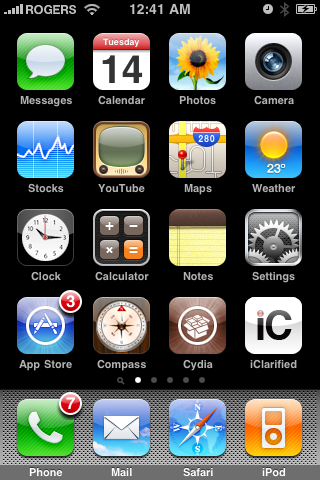 Step Two
Press to select the Manage tab at the bottom of the screen.
 Step Three
Press to select the large Sources button
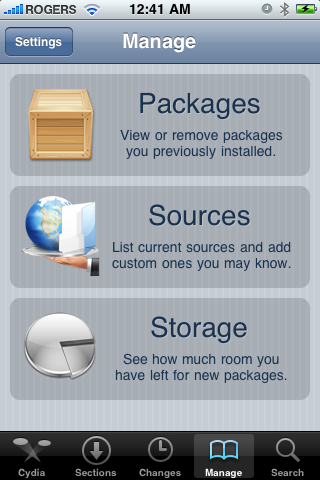 Step Four
Press the Edit button at the top right of the screen.
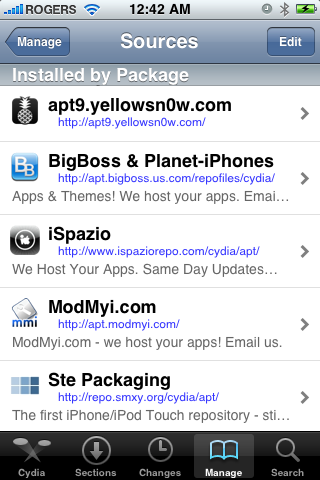 Step Five
Press the Add button at the top left of the screen.
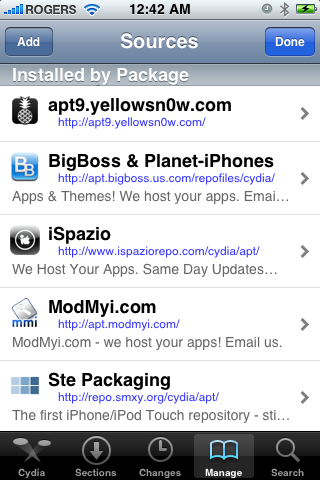 Step Six
Enter http://apt.geohot.com/ as the source url and press the Add Source button.
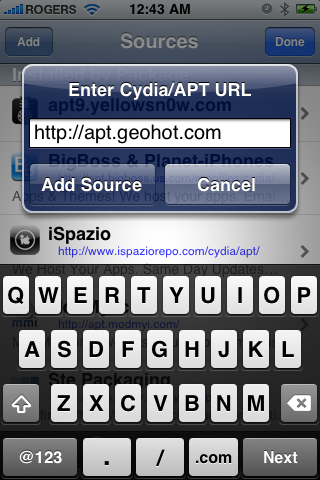 Step Seven
Once the source has been added press the large Return to Cydia button.
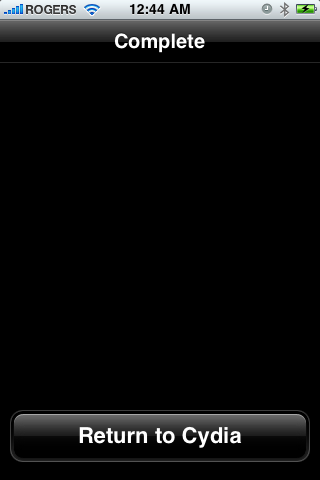 Step Eight
Press the Done button at the top right of the screen.
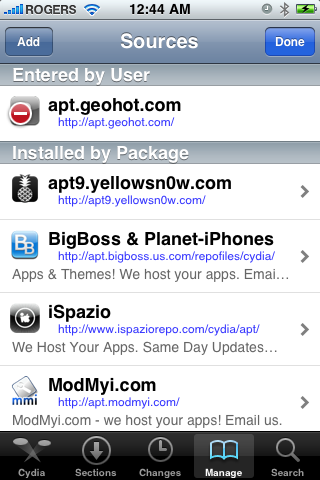 Step Nine
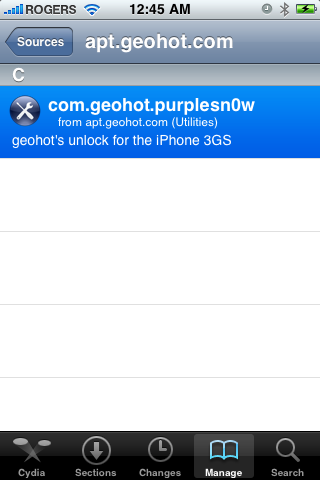
Press to select apt.geohot.com from the list of user entered sources.
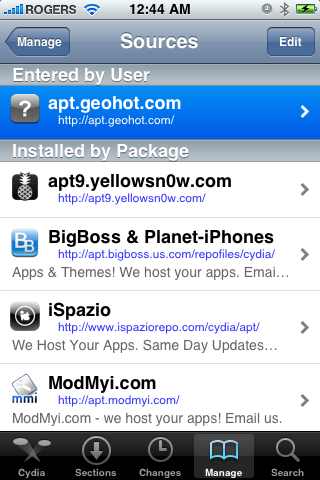 Step Ten
Press to select com.geohot.purplesn0w from the list of packages
 Step Eleven
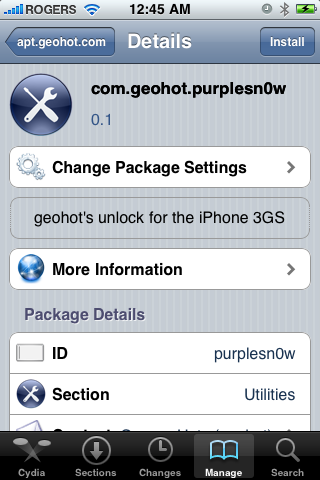
Press the Install button at the top right of the screen.
 Step Twelve
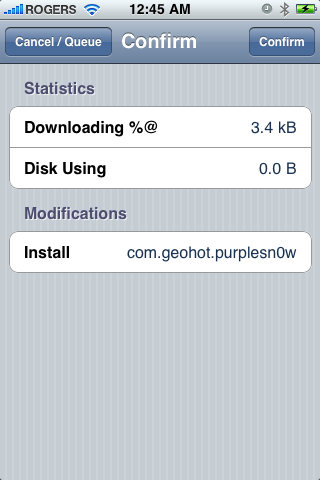
Press the Confirm button at the top right of the screen.
 Step Thirteen
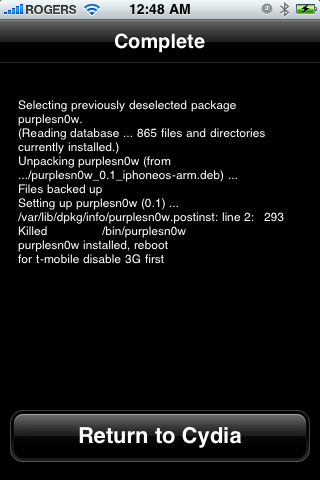
After installation completes successfully press the large Return to Cydia button.
 Step Fourteen
Now press the Home button then power off and power on the iPhone. You do this by holding down the power button for 3 seconds then moving the power slider that appears to the right. Press the power button again to turn on the phone.
 You should now be able to insert the SIM of your choice!
Popularity: unranked [?] written by Duy Phong
\\ tags: 3G, App, Apple, Cydia, Iphone, Mac, OS, Tutorial, Unlock
 The iPhone Dev-Team has updated the UltraSn0w unlock to use some of the good ideas from PurpleSn0w. They have also provided a very detailed explanation of how PurpleSn0w and UltraSn0w work. The iPhone Dev-Team has updated the UltraSn0w unlock to use some of the good ideas from PurpleSn0w. They have also provided a very detailed explanation of how PurpleSn0w and UltraSn0w work.—–
The day before yesterday, some fellow named geohot released a program called “purplesn0w” which claims to be a better unlock than our ultrasn0w solution. He was kind enough to provide source, which we naturally took apart to try to validate his claims.  We’ve found he had come up with some pretty neat ideas, including patching the actual text of the baseband code by copying it over to RAM and then using the MMU and page tables to have the baseband pretend it is part of the original bootrom. Of course, like yellowsn0w and ultrasn0w, this code has to be reloaded with every reboot of the baseband. However, the advantage of this is that developing unlocking payloads is a lot simpler… in fact, geohot used the same payload in AnySim and BootNeuter. We kicked around this idea ourselves before, but eventually found a work-around for the same problem with the yellowsn0w/ultrasn0w payload. The two pieces of code have the exact same effect on the baseband… with the difference that geohot’s exploit overwrites an arbitrary block of memory one megabyte in size. The baseband has a total of eight megabytes of memory and every bit of it is earmarked for use (except for 485212 bytes of it which we haven’t accounted for yet, but that’s still less than 1 MB). This means that eventually the area of memory geohot is using will be corrupted and 1 MB of baseband code will be corrupted (until the next reboot). How soon will this happen? Will it even matter in day-to-day use? We don’t know, because we haven’t spent much time looking. However, why take the risk when the yellowsn0w/ultrasn0w payload accomplishes the same job with no corruption? We’ve found he had come up with some pretty neat ideas, including patching the actual text of the baseband code by copying it over to RAM and then using the MMU and page tables to have the baseband pretend it is part of the original bootrom. Of course, like yellowsn0w and ultrasn0w, this code has to be reloaded with every reboot of the baseband. However, the advantage of this is that developing unlocking payloads is a lot simpler… in fact, geohot used the same payload in AnySim and BootNeuter. We kicked around this idea ourselves before, but eventually found a work-around for the same problem with the yellowsn0w/ultrasn0w payload. The two pieces of code have the exact same effect on the baseband… with the difference that geohot’s exploit overwrites an arbitrary block of memory one megabyte in size. The baseband has a total of eight megabytes of memory and every bit of it is earmarked for use (except for 485212 bytes of it which we haven’t accounted for yet, but that’s still less than 1 MB). This means that eventually the area of memory geohot is using will be corrupted and 1 MB of baseband code will be corrupted (until the next reboot). How soon will this happen? Will it even matter in day-to-day use? We don’t know, because we haven’t spent much time looking. However, why take the risk when the yellowsn0w/ultrasn0w payload accomplishes the same job with no corruption? The second new idea he had was to patch CommCenter rather than use a daemon. At first, this idea seemed pretty distasteful to us. Binary patches are messy and difficult to maintain (we figure it’s partly why he only made a version for 3G S and not 3G as well). In addition, the stated reason of reduced battery life with a daemon is factually incorrect, since any computer science student who’s taken a course in operating systems will tell you that a sleeping task takes up exactly NO CPU resources and NO power (it’s merely skipped over during context switches). That’s right: not “only a little” power, but absolutely NO power. However, ultrasn0w 0.6 did have a problem where the STK refresh command it used crashed the baseband in 3G S. This caused the baseband to continually come up and then restart. That DOES take power and so may explain the issues that people have been seeing. ultrasn0w 0.8 was supposed to have fixed this issue, but perhaps not completely. This is because the STK refreshes we used are inherently unreliable… but we thought they were necessary to avoid people having to reinsert their SIM. Turns out we were wrong on that score. geohot’s method shows that we can perform the unlock before CommCenter polls for lock state. When we do it before (instead of after), the STK refreshs are no longer necessary! The only way to do it before the polling, however, is to modify CommCenter. We’ve tried to make the best of a bad situation by using MobileSubstrate to perform the modification. This lets us modify the behavior of CommCenter without touching the actual binary. We also used a method to dynamically locate the patch location so that it should work on both 3G and 3G S (and should need to be updated less frequently). We also do it in a different way so that hactivated phones will work with the unlock (unlike purplesn0w). You’ll find that this update is now available through Cydia as ultrasn0w 0.9 We thank geohot for contributing to the scene once again. We don’t think purplesn0w is the right path, but it has certainly helped us improve ultrasn0w! P.S. geohot, seriously, stop dicking around and look at the bootrom instead kthx. =P
—– You can find instructions on how to unlock your iPhone using UltraSn0w here. Read More Popularity: unranked [?] written by Duy Phong
\\ tags: 3G, App, Cydia, Iphone, OS, Unlock
|


Comments