![How To Jailbreak IOS 4.1 Beta On IPhone 3G Using Redsn0w[Windows/Mac]](https://feedads.g.doubleclick.net/~a/zT9ln4XinK6-B_1Q3sS69uu49BM/0/di "How To Jailbreak IOS 4.1 Beta On IPhone 3G Using Redsn0w[Windows/Mac]")
![How To Jailbreak IOS 4.1 Beta On IPhone 3G Using Redsn0w[Windows/Mac]](https://feedads.g.doubleclick.net/~a/zT9ln4XinK6-B_1Q3sS69uu49BM/1/di "How To Jailbreak IOS 4.1 Beta On IPhone 3G Using Redsn0w[Windows/Mac]")
This is strictly for iPhone 3G and iPod Touch 2G (non-MC model) only. If your iPhone 3G relies on an unlock, DO NOT update to iOS 4.1 Beta now as the current version of ultrasn0w cannot unlock this new firmware.
Please Note that this is only for Developers
If you have iPhone 3G (which doesn’t rely on an unlock), or an iPod Touch 2G (non-MC model), then simply follow this guide
Step 1:
Download iOS 4.1 Beta for your version of iPhone and iPod touch.
Step 2:
Update to this latest firmware using the IPSW file you just downloaded via iTunes 9.2
Step 3:
Start Redsn0w 0.9.5b5-5 (download link given below) and point it to iOS 4 (Final Version), and not iOS 4.1 firmware file to proceed with the jailbreak.
Redsn0w 0.9.5b5-5 (Windows)
-
Redsn0w 0.9.5b5-5 (Mac)
![6 How To Jailbreak IOS 4.1 Beta On IPhone 3G Using Redsn0w[Windows/Mac]](http://www.redmondpie.com/wp-content/uploads/2010/04/6.jpg "Jailbreak iPhone OS 4")
Step 4:
Now select “Install Cydia” and click “Next”.
![JailbreakiPhone4.0 How To Jailbreak IOS 4.1 Beta On IPhone 3G Using Redsn0w[Windows/Mac]](http://www.redmondpie.com/wp-content/uploads/2010/04/JailbreakiPhone4.0.jpg "Jailbreak iPhone 4.0")
Step 5:
Now make sure your device is both OFF and PLUGGED IN to the computer before you click “Next”.
Step 6:
Connect your device in recovery mode by pressing the Power and buttons continuously.
![51 How To Jailbreak IOS 4.1 Beta On IPhone 3G Using Redsn0w[Windows/Mac]](http://www.redmondpie.com/wp-content/uploads/2010/04/51.jpg "Jailbreak iPhone 4.0 Beta")
At this stage you will be presented with a screen where you will have to quickly hold “Power” button and then while holding the “Power” button, you will now have to hold “Home” button too. Now after few seconds release “Power” button but keep holding “Home” button until installation begins.
Step 7:
Once done, your iPhone will restart automatically and you will find it jailbroken on the latest iOS 4.1 Beta firmware.
written by Duy Phong
\\ tags: 3G, App, Apple, Cydia, Download, Iphone, ITunes, Mac, OS, Rapidshare, Unlock


The best and the most easiest jailbreak tool has just been updated (unofficially?) to bring support for iTunes 9.2. Earlier when Apple released the final version of iTunes 9.2, it broke the compatibility with Spirit and so this new version brings the required fix to make it compatible with iTunes 9.2. However no new feature has been added. It still does not work with iOS 4 and iPhone 4. Only iOS 3.1.3 and 3.1.2 for iPhone 3GS, 3G, 2G, iPod touch, and iOS 3.2 for iPad is supported.

Instructions are still the same. You can follow our complete step by step guides to jailbreak your iPad, iPhone 3GS, 3G, 2G and iPod touch 3G/2G on 3.1.3 using Spirit.
For those of you with iPhone 3GS (new bootrom), iPod touch 2G (MC model) and iPod touch 3G who upgraded to iOS 4, only to find out that you cant jailbreak it back can actually downgrade back to iOS 3.1.3 and then jailbreak it using Spirit. Step by step guide for downgrading your iOS device from iOS 4 to iOS 3.1.3 can be found here (works only if you have SHSH blobs saved for 3.1.3).
Unlocking can be done on any baseband using Ultrasn0w 0.93, instructions for which is posted here.
Download Spirit for Windows (with iTunes 9.2 support)
Download iTunes 9.2 for Window and Mac
written by Duy Phong
\\ tags: 3G, App, Apple, Download, Iphone, ITunes, Mac, OS, Rapidshare, Unlock
In the last post, we provided you links to download iTunes 9.2 beta and iOS 4 GM for iPhone and iTouch. If you are in a hurry to upgrade and jailbreak, there’s a trick that will allow you to use PwnageTool and create a custom firmware. Since the baseband of our iPhones was already upgraded, we can’t confirm 100% that it will preserve your baseband and that you can unlock. Use it at your own risk.
NOTE: this is not an official DevTeam release, so if you don’t know what you’re getting into, you better wait for an official iOS/jailbreak/unlock release.
You will need:
NOTE: The Cydia package that is currently in PwnageTool does not work for 4.0. The easiest way to get it working is to download the redsn0w jailbreak for beta 4 and extract Cydia from there and put it into your custom PwnaGetool.
How to:
1. Download the bundle and all the tools and place them on your desktop
2. First, you will need to download the custom bundle and copy it into PwnageTool. To do that, right click on PwnageTool.app and ‘Show Package Contents’ .
Browse to Contents>Resources>Firmware Bundles> and copy thecustom bundle…
3. Right click on redsn0w.app and ‘Show Package Contents’. Browse to Contents>MacOS> . Copy Cydia.tar.gz on your desktop and extract its content.
Now you will need to copy Cydia into PwnageTool.app. To do that, right click on Pwnagetool.app and ‘Show Package Contents’. Browse to : Contents>Resources>CustomPackages> right click on ‘CydiaInstaller.bundle’ and ‘Show Package Contents’ > Files> and overwrite all the files with the ones you just extracted from redsn0w
4. That’s it. Now load PwnageTool.app and create your custom firmware. If you don’t know how, check this tutorial
5. Once you got the custom .ipsw, you will restore your iOS device via iTunes. Your iOS device must be jailbroken. Put the device in recovery mode and restore.
NOTE: this is NOT an official DevTeam release, and we cannot 100% confirm that it will preserve your baseband. Use it at your own risk
written by Duy Phong
\\ tags: 3G, App, Apple, Application, Cydia, Download, Iphone, Itouch, ITunes, Mac, OS, Rapidshare, Tutorial, Unlock
aDownloader is a download manager that lets you download many different files to your iPhone or iPod Touch. With over 40 supported files, aDownloader will download all your files over any available network, from any site, including hosting sites such as RapidShare and MegaUpload.

The supported files include but are not limited to:
- PDF
- Word (doc and docx)
- Excel (xls, xlsx)
- PowerPoint (ppt, pptx)
- Audio files (mp3, m4a, wav)
- Videos (mpeg, 3gp, mov, youtube)
- Image files (jpg, png, gif, bmp)
- Text files (txt, html, xml)
- RAR and Zip archives (including multipart, password protected)
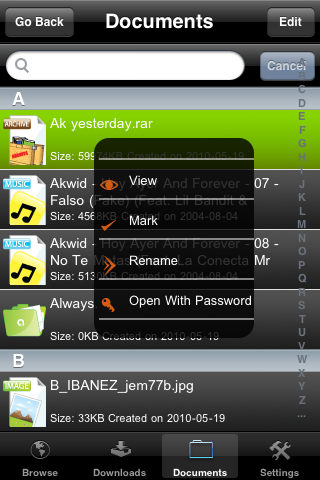
With aDownloader, you can easily manage and organize your downloads by creating folders, copying, deleting and moving files around.
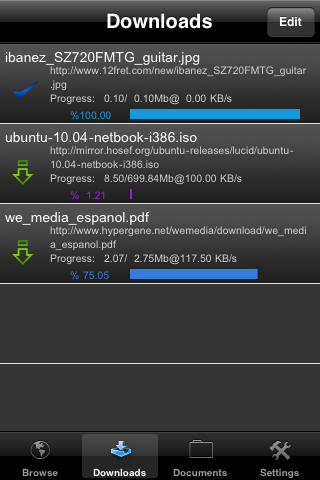
This app gives you access to multiple simultaneous downloads, with no file limit. You can pause/resume interrupted downloads. If your internet connection fails, you can even resume your download later.
Finally, the best feature seems to be that you can download/upload your files to/from your desktop computer via your web browser.
I haven’t tried aDownloader myself but it sure looks like a winner for those of you who need to regularly download files to your iPhone.
aDownloader is a free application you can download right now from Cydia. If you try aDownloader, please share your feedback with us in the comments section.
written by Duy Phong
\\ tags: 3G, App, Application, Cydia, Download, Free, Iphone, OS, Rapidshare

|
aDownloader is new download manager for the iPhone, iPod touch, and iPad.
Features:
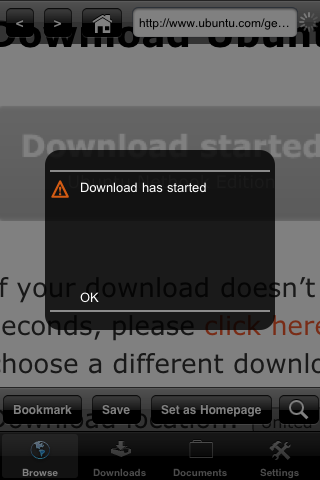
● Download all your files over any available network, from any site, including hosting sites such as rapidshare and megaupload.
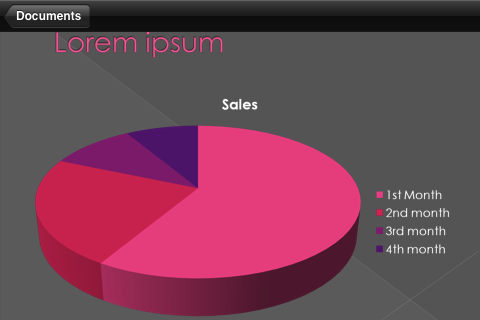
● Over 40 supported file types, including: PDF, Word(doc and docx), Excel(xls, xlsx), Power Point(ppt, pptx), Audio files (mp3, m4a, wav), video(mpeg, 3gp, mov, youtube), Image files (jpg, png, gif, bmp), text files (txt, html, xml), RAR and Zip archives (including multipart, password protected).
● Manage and organize! You are able to create folders, cut, copy, delete, and move around files.
● Unlimited: Multiple simultaneous downloads, no file limit, file sharing.
● Pause/Resume interrupted downloads. If connection fails, you can resume your download later.
● Use as a Pen drive. Download your files to your desktop computer, Use your favorite browser(Explorer, firefox, safari, etc…) to download and upload files from and up to your device.
aDownloader is available for download from the BigBoss Cydia Repository for free.
|
|
written by Duy Phong
\\ tags: 3G, App, Apple, Cydia, Download, Free, Iphone, OS, Rapidshare
|




Comments