 Ladies and gentlemen, allow me to introduce you to the future of utilities apps. Tapbots, a series of three utilities apps with robot inspiration, showcase how increased functionality does not mean a sacrifice of unique and impecable design. Ladies and gentlemen, allow me to introduce you to the future of utilities apps. Tapbots, a series of three utilities apps with robot inspiration, showcase how increased functionality does not mean a sacrifice of unique and impecable design.
The idea for Tapbots was formulated when the two creators, Paul and Mark, left Oakley, Inc. to pursue ideas for simple weight-tracking apps, inspired by the success of the Wii Fit. Once they began their mission and discovered that their designs were reminiscent of characters from Wall-E, the idea struck them — why not have multiple apps, each based on a different robot with its own specialized task? Thus was born the family of Tapbots. There are currently three members:


Weightbot is the original Tapbot and the one that led Paul and Mark to conceive of the Tapbot family. It is possibly the coolest weight-tracking tool out there, and does so in a way that is simply about numbers — no BS motivation that you’re not going to listen to. Height can be entered into the settings so that when you input your weight, your BMI is automatically calculated. You can easily scroll through the days to track your progress. However, the appearance and simplicity are not the coolest things about Weightbot; the app also allows you to shake an entry to delete it, turn the screen to the left to see a chart of your progress (the weight you’ve gained or lost, where you are currently, where your goal is and what you need to reach it, and how much time has passed and how much time you have left to achieve your goal), and turn the screen to the right to see a graph of where you are, where your goal is, and what would be considered “overweight” for your height. Weight tracking has never been so on-point.


Convertbot is a sleek and simple conversion tool. Instead of the rudimentary lists that most other conversion apps have, Convertbot has a wheel that you spin through, deciding what you’re converting. Furthermore, when you click the units in the lower corners of the wheel, the wheel transforms to display particular units, maintaining the same look through each step of the conversion. Finally, unlike many other apps, Convertbot allows you to convert mixed units (such as feet + inches), creating the most intuitive interface out there. Simple taps reverse the order of the units presented and get you to the number pad, and nothing you do changes the deviceful design.

Finally, there is Pastebot. The premise of Pastebot is essentially this: anything you copy on your device, be it text or pictures, is automatically transferred to the Pastebot Clipboard, so that you always have it and so that you can paste it into any other application at any time. You can edit text entries and do things such as encode HTML, convert to uppercase, or translate them as well. You can also search the text on Google or send it as an e-mail. With the pictures, you can edit them as well — convert them to black and white, invert them, etc. — and you can e-mail them or save them to the device. Entries can be grouped and are saved until you delete them. Meanwhile, the graphics are flawless, and actually make you feel as though you’re using more of a game or machine than a utilities application.
The Tapbots family has quickly found a place in my heart. Not only are they the best-looking utilities apps on the block, they are also provide some of the best functionality around. Their unique designs alone are worth the investment (each app ranges between $1.99 and $2.99). They prove that utilities apps don’t have to adhere to the “boring” stereotype; they can be simultaneously fun and useful! I can’t wait to see what member they will welcome next!
This article was published by iphoneapplicationlist.com
written by Duy Phong
\\ tags: App, Apple, Application, Game, Google, Iphone, Mac, OS


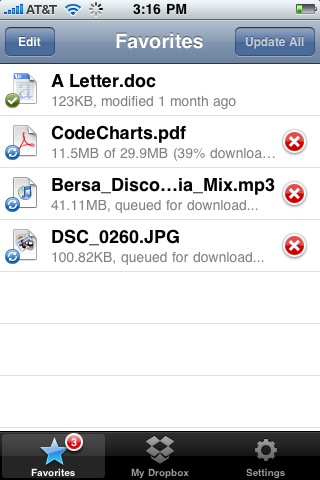
 The first Multitasking enabled apps are now appearing in the Apple App Store, ready for iOS 4. Dropbox, a well-known app is one of the first to support iOS 4’s Multitasking API. Multitasking is a iOS 4’s new feature which is only available on 3GS and iPhone 4 devices. To help with battery issues, Apple introdocued seven background services for iOS 4, which include:
- Background audio – Allows your app to play audio continuously.
- Voice over IP – Users can now receive VoIP calls and have conversations while using another app.
- Background location – Navigation apps can now continue to guide users who are using other apps
- Push notifications – Receive alerts from your remote servers even when your app isn’t running.
- Local notifications – Your app can now alert users of scheduled events and alarms in the background, no servers required.
- Task finishing – If your app is in mid-task when your customer leaves it, the app can now keep running to finish the task.
- Fast app switching – This will allow users to leave your app and come right back to where they were when they left – no more having to reload the app.
It seems as if most iOS 4 apps should and will and will implement ‘fast app switching’ which allows you to switch in and out of an app without having to restart it.
Apple will distribute iOS 4 June 21st.
via Mac Rumors
written by Duy Phong
\\ tags: 3G, App, Apple, Iphone, ITunes, Mac, OS

Caster FREE 0.4.1
Category: Utilities
Price: Free, Version: 0.4 -> 0.4.1 (iTunes)

Description:
Create and publish podcasts on your mobile device!
Free Version
• With Caster Free, you are limited to three minutes
• All other functionality is intact
• The full Caster app allows you to make as big a
podcast as you have room on your device.
http://itunes.apple.com/us/app/foodev/id342418943
Features
• Record chunks of audio at a time or all at once
• Waveform editor
• Clip reordering and deleting
• Cut, Copy, Paste
• Audio Normalization
• All podcast clips are combined into a single file
• Multi-track recording and editing
• Choose bitrate/number of channels and output format
• supports wav, m4a/ALAC, and ogg/vorbis outputs
• create and restore backups of your podcast projects
• iPhone version allows portrait or upside-down portrait for better microphone positioning
• Download your completed podcasts via FTP or
publish directly from the palm of your hand!
• Existing podcast RSS files are synced with Caster
• All RSS Fields are editable from your device
• Review previously recorded podcasts
• copy and paste between podcast issues
• Automatically generates a new RSS when publishing
• Upload existing audio clips for use in your podcast
• FTP Server to download your podcast via WIFI
• FTP Client to automatically publish your podcast
• Built in documentation
• Publish via email, and link in twitter and facebook
Coming soon: libsyn, dropbox, and soundcloud support!
————————–
http://www.foodev.mobi
————————–
follow me on twitter: http://twitter.com/foodev
or email me: [email protected]
suggestions and comments welcome!
What’s New
Fixed a crash on the iPad when you restore a backup.
Caster FREE
written by Duy Phong
\\ tags: Android, App, Apple, Download, Free, Iphone, ITunes, Mac, OS
 …and works for both Mac AND PC. …and works for both Mac AND PC.
We live in the age of – Multi-Tasking. Thanks to the technology such as computers, anybody now has the ability to get a million things done at the same time on a single screen. Take an example of an average high school kid. On a single computer screen, he/she chats on AIM/facebook, goes on facebook, listens to music, surfs the web, talks on Skype, checks e-mail, writes an essay, blah. And it all works out-somehow – amazing. But doing all that on a small, limited computer screen could be inefficient and frustrating. Then, everybody wondered whether there could be a way to increase the viewable area.
Then comes the iDisplay.
iDisplay basically turns your iPad/iPhone/iPod touchscreen into a convenient side monitor for your Mac OR PC, letting you maximize your screen and multi-task even more! iDisplay can be used for anything, including watching flash videos, IM, twitter, weather/news gadgets, and other tools. The app is the ONLY secondary display software that works for both Mac AND PC. The best part is that it is much cheaper than all its competitors.
The NEW VERSION 1.1 is much faster than the older version, supports landscape orientation, and right click function(tap and hold to simulate).
So if you are a busy-body like me on a computer…this just might let you finish your tasks a little faster – while doing everything else at once. Pretty sweet.
  
This article was published by iphoneapplicationlist.com
written by Duy Phong
\\ tags: App, Apple, Application, Iphone, Mac, OS, Skype
This is one of the first few articles in a series of Pulse2 articles called How To Guide. If you would like to have a tech question answered, send an e-mail to [email protected].
The Security Toolbar, known as Security Toolbar 7.1 is one of the most annoying Trojans around right now. It is also known as the smitfraud Trojan and it is known to invade your privacy and attack your computer with pop up windows. To kill off the Security Toolbar 7.1, you have a few options.
Option 1. Use a specific removal software
Use the SmitFraudFix [Link]
Option 2. Use anti-virus software
Spybot Search & Destroy or AdAware. Do full scans with both of them.
Option 3. Remove it Manually
1. Press CTRL+ALT+DEL
2. Click Start Task Manager
3. Click Processes
4. End the following processes:
“tinyproxy.exe”
“isamonitor.exe”
“pmmon.exe”
“pmsngr.exe”
“isamini.exe”
“isamonitor.exe”
“pmmon.exe”
“pmsngr.exe”
“pmuninst.exe”
“iesuninst.exe”
5. After ending the processes. Do a search for the following filenames.
“Video ActiveX Access”
“Security Troubleshooting.lnk”
“Online Security Guide.lnk”
“Online Security Test.url”
6. Lastly Unregister the DLL files associated with the Trojan
a. Type cmd into the search programs and file boxes.
b.Now Type the following commands when the black DOS box pops up.
“regsvr32 /u iesplugin.dll”
“regsvr32 /u isaddon.dll”
“regsvr32 /u dxovx.dll”
“regsvr32 /u vgibz.dll”
“regsvr32 /u khtbpdl.dll”
“regsvr32 /u cfqbw.dll”
“regsvr32 /u fdpzgi.dll”
“regsvr32 /u gusur.dll”
7. Delete the Registry Keys
a. Click the Star Menu
b. Type regedit in the search programs and files box. The Windows Registry Editor will open.
c. Now locate the registry keys below and delete them. To delete it, right click on the file and click on Delete.
“HKEY_LOCAL_MACHINE\SOFTWARE\Microsoft\Windows\CurrentVersion\Uninstall\Messenger Service”
“HKEY_LOCAL_MACHINE\SOFTWARE\Classes\CLSID\{D61D7E1A-6613-49CA-B6F9-51DB248E209D}”
“HKEY_LOCAL_MACHINE\SOFTWARE\Microsoft\Windows\CurrentVersion\Explorer\Browser Helper objects\{D61D7E1A-6613-49CA-B6F9-51DB248E209D}”
“HKEY_LOCAL_MACHINE\SOFTWARE\Microsoft\Windows\CurrentVersion\Uninstall\IExplorer Security Plug-in”
“HKEY_LOCAL_MACHINE\SOFTWARE\Microsoft\Windows\CurrentVersion\Uninstall\Internet Explorer Secure Bar”
“HKEY_LOCAL_MACHINE\SOFTWARE\Classes\CLSID\{aa6d4f53-4c8d-4549-84d2-02d584acc4e9}”
“HKEY_LOCAL_MACHINE\SOFTWARE\Classes\CLSID\{5574E139-F59C-4bee-9A61-150B0D3A16C7}”
“HKEY_LOCAL_MACHINE\SOFTWARE\Classes\CLSID\{A6790AA5-C6C7-4BCF-A46D-0FDAC4EA90EB}”
“HKEY_LOCAL_MACHINE\SOFTWARE\Classes\Interface\{6DEEE498-08CC-43F0-BCA0-DBB5A25C9501}”
“HKEY_LOCAL_MACHINE\SOFTWARE\Classes\Interface\{967A494A-6AEC-4555-9CAF-FA6EB00ACF91}”
“HKEY_LOCAL_MACHINE\SOFTWARE\Classes\Interface\{9692BE2F-EB8F-49D9-A11C-C24C1EF734D5}”

written by Duy Phong
\\ tags: Mac, OS
|


Comments