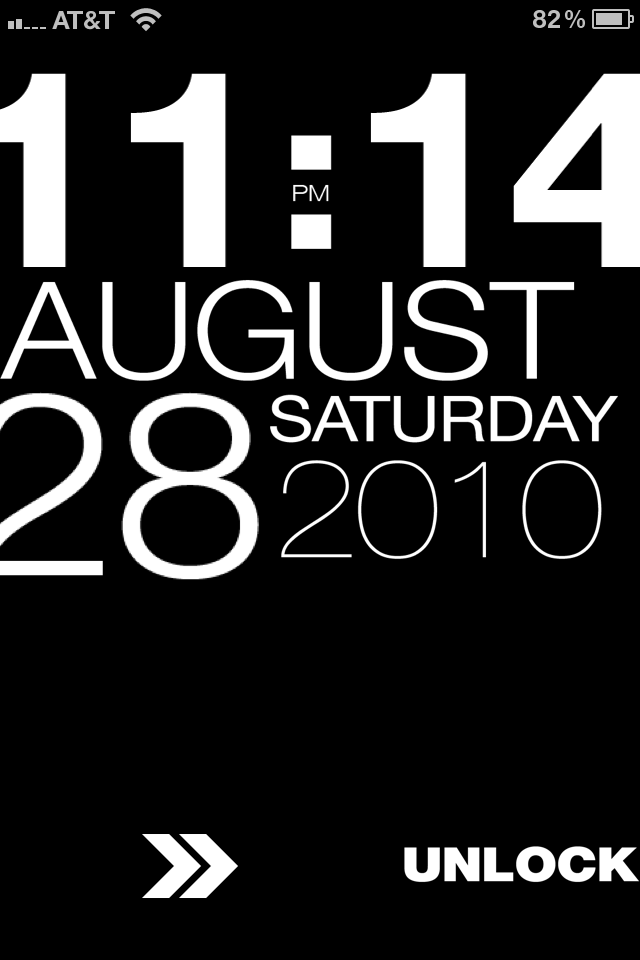
I found this awesome lockscreen on Cydia yesterday, with a little help from AtomicMufin on Twitter. It’s called TypoPhone 4 and it’s basically a lockscreen theme that shows the time and date in large bold letters. It also contains this cool unlock slider. You can download it from Cydia and activate it with Winterboard.
To have it look exactly like the image above, you’ll also need to download Lockscreen Clock Hide from Cydia, which like the name suggests, hides the clock on your iPhone. Read More
written by zulu
\\ tags: cool, Cydia, Download, hides-the-clock, image, Iphone, iphone talk, jailbreak apps, lockscreen, mod, shows-the-time, wallpaper, winterboard

There is a new jailbreak app available called Volume Booster 4.0 that supposedly boosts up the volume of your iPhone. I say “supposedly” because it didn’t work for me, although I tried on 2 different iPhones. Maybe you’ll be more successful than I was…
After downloading Volume Booster from Cydia, you have to go an activate it in WinterBoard, just like you would activate a theme. You won’t see any icon or options in the settings.app. Read More
written by gunturbabu
\\ tags: because-it-didn, booster, Cydia, Download, Iphone, jailbreak apps, mod, phone-download, phones-maybe, settings, volume, winterboard
Customization is probably one of the biggest reasons people jailbreak their iDevices, I know personally I love the ability to make my iPhone mine. There are endless possibilities for customizing you device starting from the smallest things such as battery themes to full blown all out UI custom themes. There is a plethora of themes to choose from on Cydia and all of them are beautiful in there own right. Some of them are free and some you have to pay for. In my experience the paid themes are usually worth the money because they are 100% original and are normally a work of art.
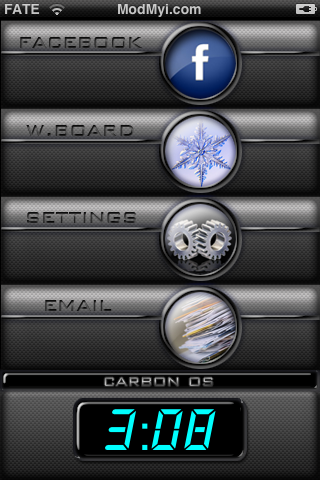
I have recently got into building themes which started of as just graphical but I soon realized that it went a lot deeper. I started learning a little HTML and .css (style sheets that simplify HTML) and springboard strings, just to name a few non graphical modifications that can be made. I soon had created my own complete theme, Carbon OS which has a lot of extras (and is available in Cydia).
I thought I would share some easy and effective methods for learning to build these themes in case you guys want to get into doing it too. I have compiled a small list of things you will need to do so and some pointers to help you get started. First things first though lets make sure we have a jailbroken device with Winterboard installed and have the ability to SSH into your device. If you need help with any of this check out our forums or our jailbreak section on this blog. Now on to what you need. Read the rest of this post…
written by janyton
\\ tags: Download, from-on-cydia, Iphone, iphone talk, money, such-as-battery, winterboard, worth-the-money


Comments